WhatsApp's latest Android beta gets Dark Mode

WhatsApp is one of the most popular messaging apps in the world right now, but it still lacks some useful features that are present on competing apps like Telegram - one of them being Dark Mode. WhatsApp is working on Dark Mode since last September. We even got a glimpse of what the Dark Mode would look like on WhatsApp for iOS. And now, we are happy to report that the company has started testing this much-requested feature on its Android app as well.
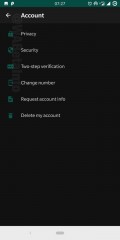
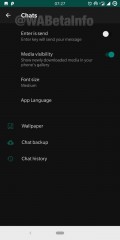
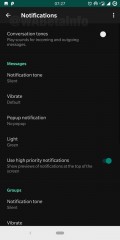
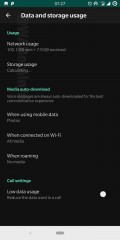
WhatsApp has begun testing Dark Mode on its beta app for Android bearing version 2.19.82. However, as this feature is still under development, it's not yet available for everyone. But thanks to the screenshots posted by WABetaInfo, we get to see how the Android app would look like with Dark Mode turned on.
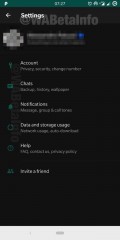
Dark Mode on WhatsApp for Android Dark Mode on WhatsApp for Android Dark Mode on WhatsApp for Android Dark Mode on WhatsApp for Android Dark Mode on WhatsApp for Android 
Dark Mode on WhatsApp for Android
Unfortunately, we don't get to see what the chat screens will look like, and the reason for that is WhatsApp has only implemented Dark Mode in the Settings page so far. We hope WhatsApp will have implemented Dark Mode across the entire Android app by the time it's released.
Furthermore, the Dark Mode for Android app is also a bit different than its iOS counterpart which is pitch black making it OLED friendly. Android, on the other hand, gets a dark grey color which could make it less useful on smartphones with OLED panels.
Source


Comments

Popular posts from this blog

GET THE POCKET-PERFECT TECNO PHANTOM V FLIP 5G FOR PRIZES AND EXCITING BENEFITS

Hey there, have you heard the exciting news? TECNO just dropped the brand new PHANTOM V Flip 5G, and it’s a game-changer! They’re going all-in to make sure you experience flip phones like never before.   Let me spill the beans on what’s happening – starting today, TECNO is rolling out a wave of amazing benefits that’ll blow your mind. When you snag the PHANTOM V Flip 5G, you’re not just getting a top-notch smartphone; you’re diving into a world of awesomeness! Picture this: you can choose between a sleek PHANTOM Draw-Bar box to keep your device safe or two stunning designer perfumes to add a touch of luxury to your everyday life. Yes, it’s your call!   Worried about keeping your device in top shape? TECNO’s got your back with a solid 12-month warranty, so you can enjoy peace of mind while rocking your PHANTOM V Flip 5G. Accidents happen, but no worries – TECNO’s throwing in a 180-day screen protection warranty. Your screen is safe and sound! Now, here’s the kicker: TECNO knows...

Making Money on TicTok: Simple Steps

  Making money on TicTok can be a fun and profitable endeavor if you're creative and consistent. Here are some simple steps to help you get started: Create High- Quality Content Choose a Niche Consistency is Key Optimize Your Profit Build Your Follower Base Use Trending Hashtags Livestreaming Monetize with TikTok Creator Fund Brand Partnerships Sell Merchandise Promote Affiliate Products Sponsorship Deals Be Authentic Learn from Analytics Be Patient Legal Considerations In detail: 1. Create High-Quality Content:    - Focus on creating engaging, unique, and high-quality videos. Your content should be entertaining, educational, or visually appealing. 2. Choose a Niche:     - Find a niche that you're passionate about and that has an audience on TikTok. Popular niches include beauty, fashion, comedy, cooking, DIY, fitness, and more. 3. Consistency is Key     - Post regularly. The more content you create, the more chances you have to gain followers and make...

How to make your Chrome book browsing experience way faster

These five tips will make Chrome as fast as it can be. one thing even a basic entry level   Chromebook   can do faster than any other computer is surfing the web with the Chrome browser.